One private app that runs your entire architecture firm.

Projects, people, money and files, all from a single computer in your own office.

Built for Architecture, Interior, Landscape & Urban Design firms.

Projects & Tasks

Every project, every task, every deadline in one register.

People & Time

Attendance, timesheets and leave, tracked without asking.

Money & Invoicing

The ledger, project dues and GST invoices your firm actually needs.

Files

Drawings and documents, organised per project, open in AutoCAD.

What is Trestle?

Everything your firm currently manages across a project register, a staff attendance register, an Excel cashbook, and a shared drive now lives in one app.

Right now, most architecture firms run on a mix of tools that do not talk to each other. A WhatsApp group for tasks. An Excel sheet for the cashbook. A shared folder for drawings. A register for attendance.

Trestle brings all of it into one place, built specifically around how an architecture firm actually works: by project type, by task, by drawing. It is installed on one computer in the office and used by everyone else from their own browser. Nothing to install, update, or manage on any other device, and nothing about your firm's data ever needs to leave your office.

Project register
Attendance register
Excel cashbook
Shared drive
TrestleOne app, on one office computer
A project register, attendance register, Excel cashbook and shared drive converging into a single Trestle application.

Runs on one PC

Install Trestle once, on a single office computer. That machine quietly holds the entire firm's data. No server, no subscription to a cloud provider.

Works over office Wi-Fi

Everyone connects over the office LAN and opens Trestle in a normal browser. No internet connection is needed to use it day to day.

Nothing to install elsewhere

Staff do not install anything on their own laptop or phone. Your firm's data stays saved locally, in your own office, on your own machine.

One app for projects, staff, money and files, running privately from your own office. Every staff member can reach it the moment they connect to the office Wi-Fi.

Roles & Access

Every staff member gets exactly the access they need. Nothing more.

One of the simplest but most important ideas in Trestle: money is private by default. Only the firm's owners can see fees, dues, and salaries. Everyone else just sees their own work.

Admin

Sees and runs everything

The firm owner or partner. Full visibility into every project, every task, and every rupee: fees, dues, and staff salaries included. Can see, at one glance, exactly which employee is working on which task right now, and can create, assign, lock, or prioritise any task.

  • Projects & tasks
  • Team & timesheets
  • Fees & dues₹ visible
  • Salaries₹ visible
  • The Ledger₹ visible

Money visible
Employee

Sees only their own work

Architects and staff log into the same app and only see their assigned projects and tasks. They can update progress, log their hours, and mark tasks complete, but they never see fees, dues, salaries, or the firm's ledger. Money stays a management-only conversation.

  • Their projects & tasks
  • Their own hours
  • Fees & dues
  • Salaries
  • The Ledger

Money hidden

Accountant

An optional, focused role

For firms that want it, a separate accountant login can be given access to the money side only: the ledger and invoicing, without needing to be involved in day-to-day project management.

  • Project management
  • Task assignment
  • Fees & dues₹ visible
  • Invoicing₹ visible
  • The Ledger₹ visible

Money visible
Dashboard

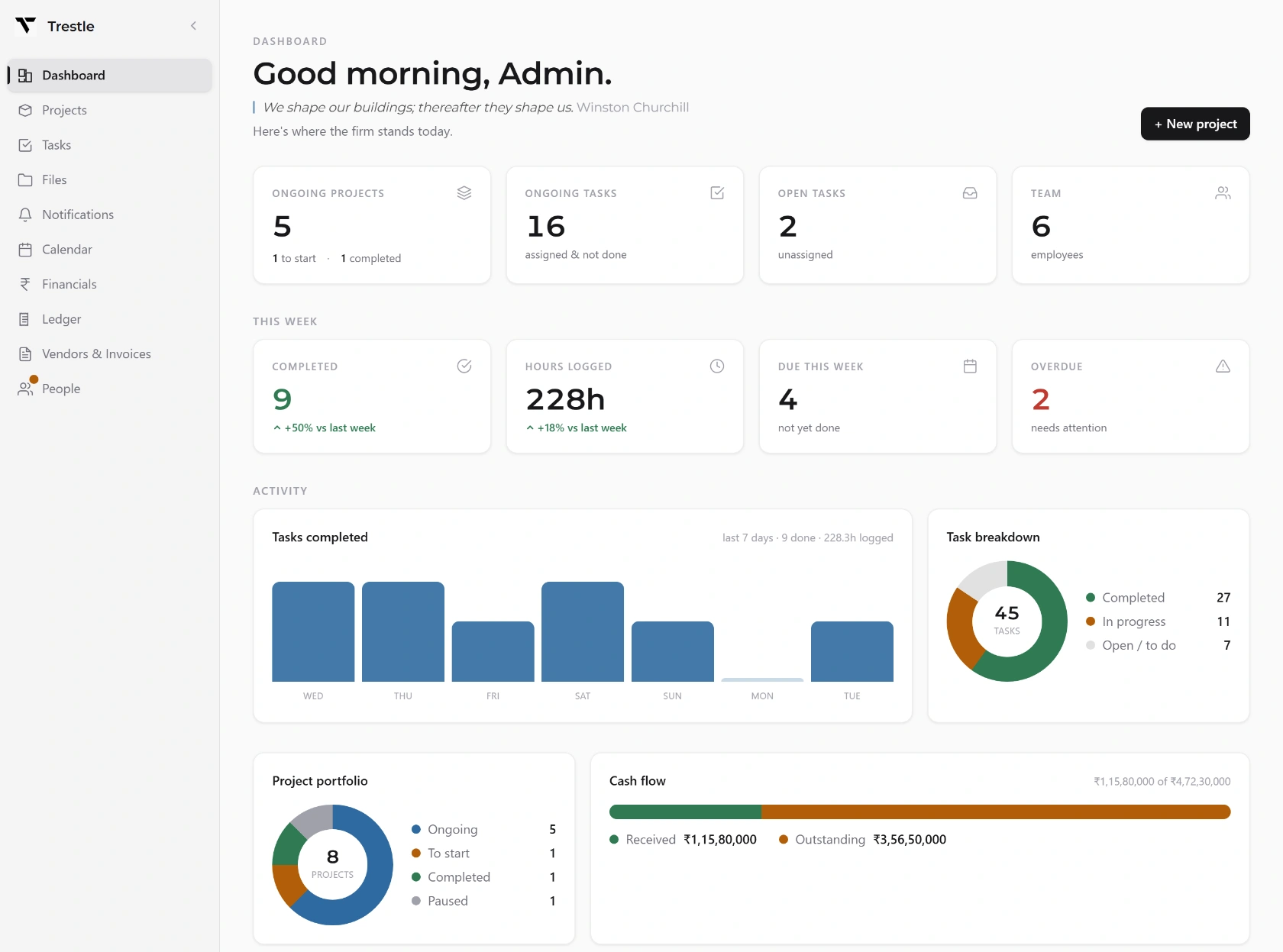
The first screen you see. A live snapshot of the whole firm.

The dashboard is the home screen for everyone who opens Trestle. Instead of asking around to find out what is happening, it is simply visible the moment you log in.

Trestle · Dashboard
The Trestle dashboard: ongoing projects, open tasks, hours logged this week, a completed-tasks chart and the firm's cash flow.
  • 1See who is working on what, right now. Owners get a live, at-a-glance view of every employee and the task currently in front of them. No status-update meetings needed.
  • 2Customisable layout. Arrange the dashboard around what matters most to your firm: active projects, pending tasks, or upcoming deadlines.
  • 3In-app notifications. Everyone is notified the moment a task is assigned to them or updated, so nothing sits unnoticed.
1 of 7

Tasks & Projects

Create a project, and its task list builds itself.

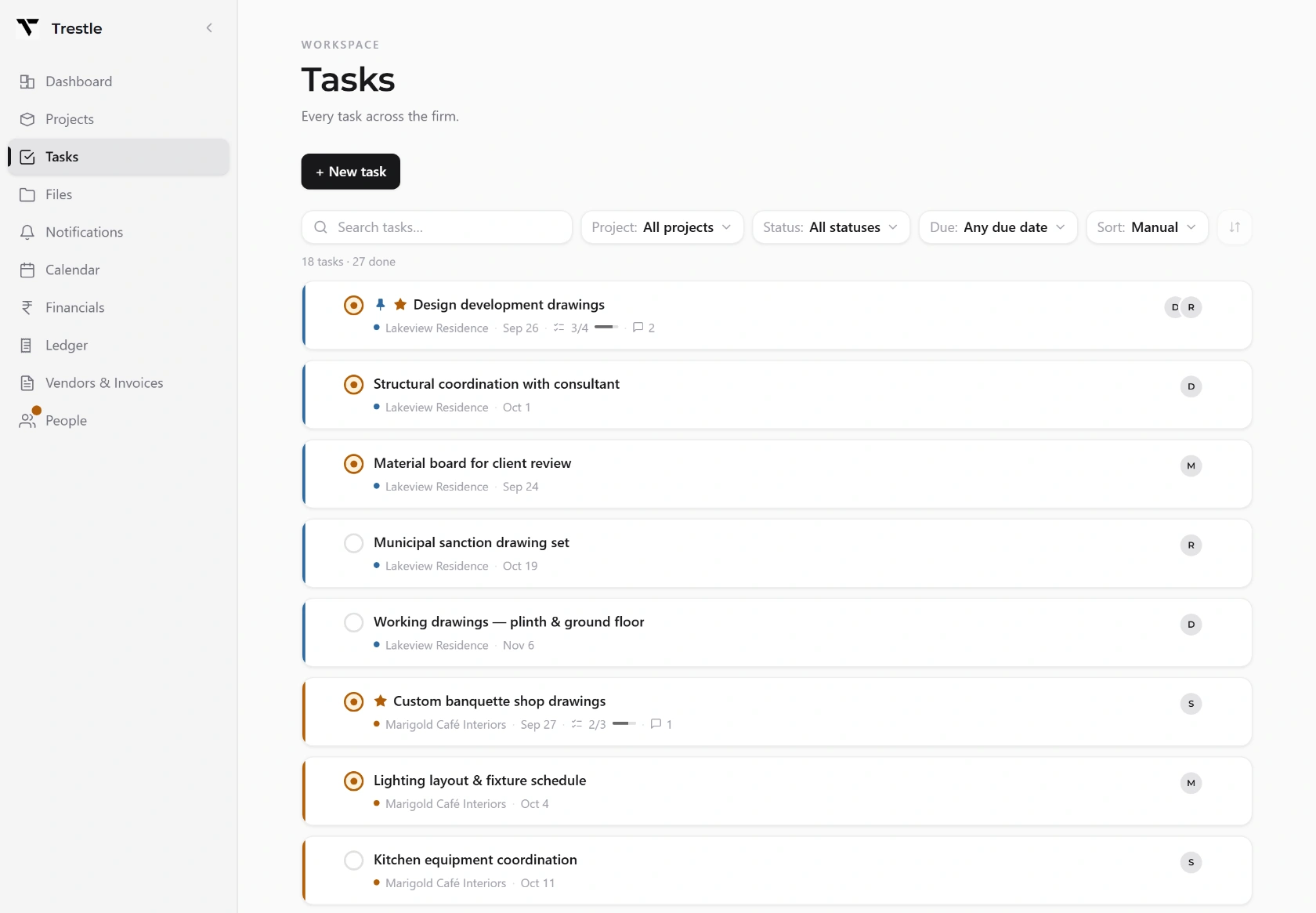
Every project in Trestle is created under one of four types: Architecture, Interior, Landscape, or Urban Design. The moment you pick a type, Trestle automatically fills in the standard checklist of tasks that kind of project always needs. Nobody has to sit down and write out a task list from scratch for every new project.

Trestle · Tasks
The Trestle task list, showing every task across the firm with its project, due date, checklist progress and who it is assigned to.
  • 1Automatic task checklist. New project, instant task skeleton, matched to the type of project it is.
  • 2Assign tasks to any employee, break bigger tasks into subtasks, and track progress with a simple completion percentage.
  • 3Lock finished tasks so they cannot be accidentally edited again, and flag priority tasks so nothing urgent gets buried.
  • 4Filter and sort the entire task list by project, employee, status, or priority. Find exactly what you are looking for in seconds, instead of scrolling.
2 of 7

Attendance

No punch-in button. No register. It just knows.

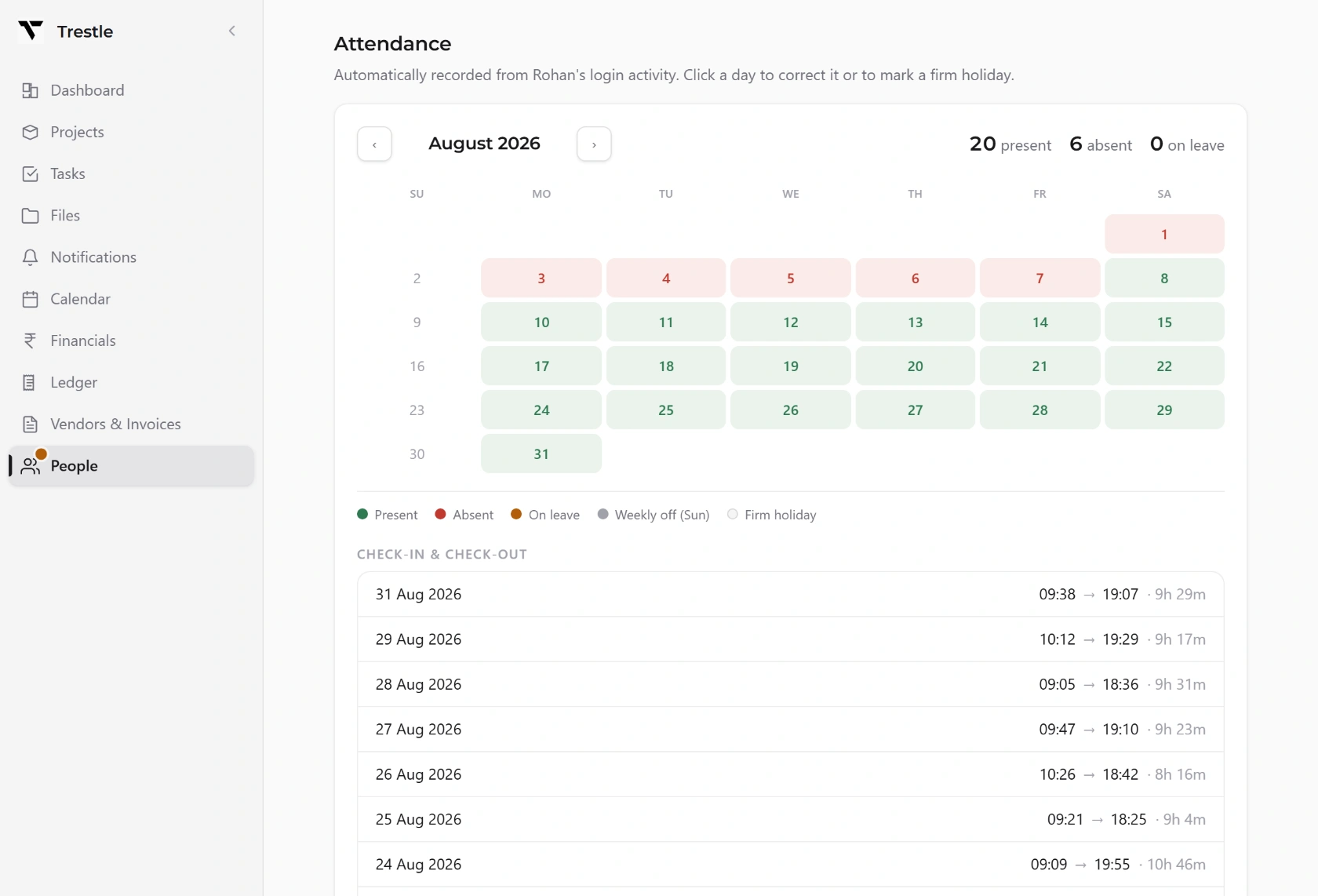
Attendance in Trestle is not something staff have to remember to do. There is no clock-in button to press and no register to sign. It is worked out quietly in the background, from the fact that someone is logged in and active in the app.

Trestle · Attendance & leave
An employee's month of attendance in Trestle, worked out from login activity, with present, absent and on-leave days and a check-in/check-out log.
  • 1Passive tracking. Attendance is picked up automatically from login and activity. Nobody forgets to mark themselves present.
  • 2Leave management is built in alongside it, so leave and attendance sit in one place instead of two different systems.
  • 3Feeds straight into pay. Because attendance is tracked automatically, it flows directly into the timesheet and pay calculation. No manual matching at month-end.
3 of 7

Employee Timesheet

Hours logged against real tasks, and pay calculated straight from them.

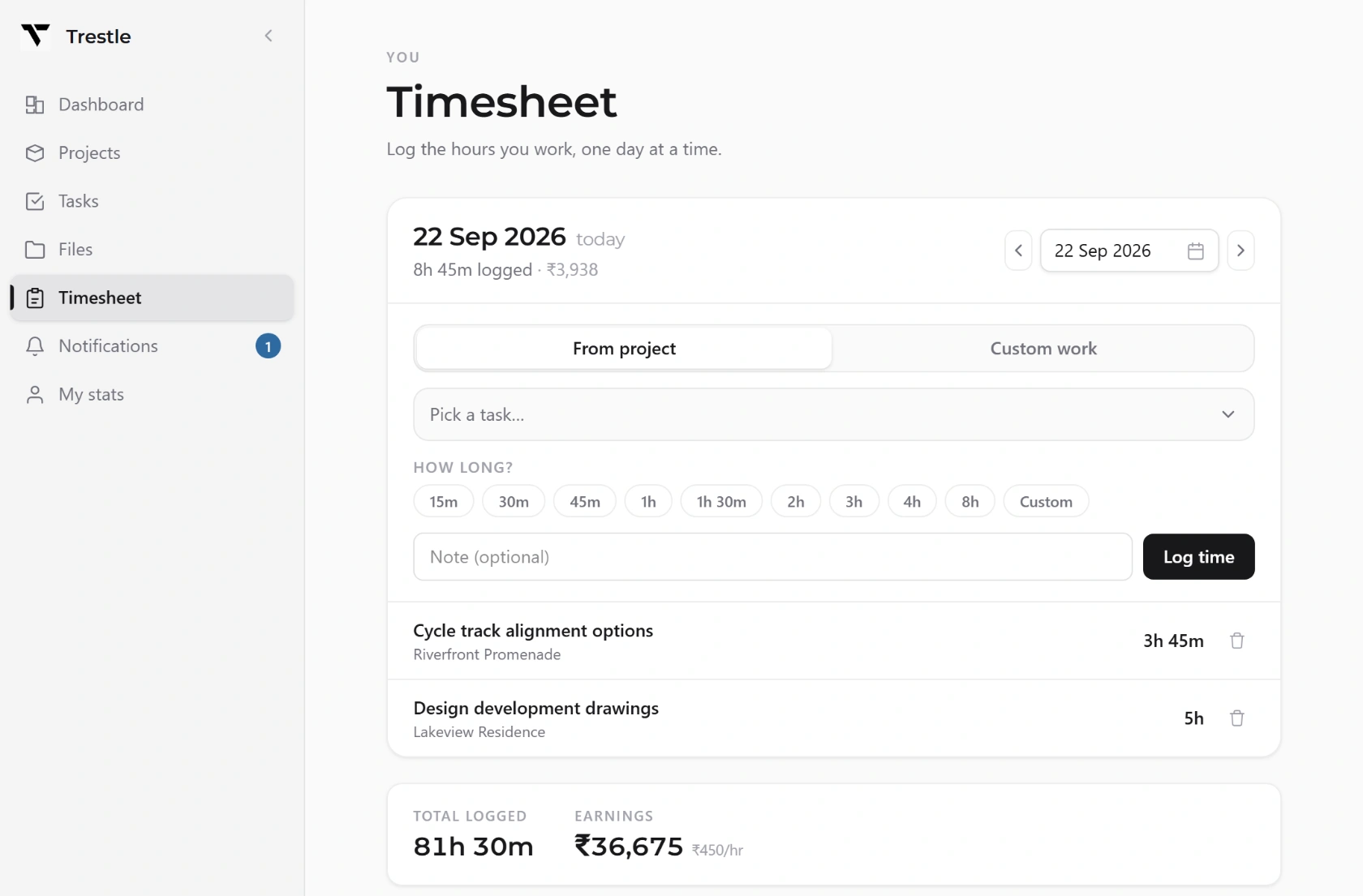
Every employee logs their hours directly against the task or project they are working on. There is no separate spreadsheet to fill in at the end of the week. The timesheet lives right next to the work itself.

Trestle · Timesheet
A Trestle timesheet: hours logged against a task for the day, with the total and the earnings calculated from an hourly rate.
  • 1Log hours per task, per project. A clear, honest record of where everyone's time actually goes.
  • 2Pay calculated from logged hours. Salary is worked out directly from the timesheet, so pay always matches actual work recorded. No manual re-entry.
  • 3Efficiency, per employee. A simple efficiency metric shows how productive each person's logged time has been, useful for reviews and workload planning.
  • 4Filter and sort timesheets by employee, project, or date range to review any period instantly.
4 of 7

Invoicing

A proper GST invoice, on your own letterhead, in a click.

Instead of typing up an invoice by hand every time a client needs to be billed, Trestle generates it for you: correctly formatted, GST-compliant, and carrying your firm's own letterhead.

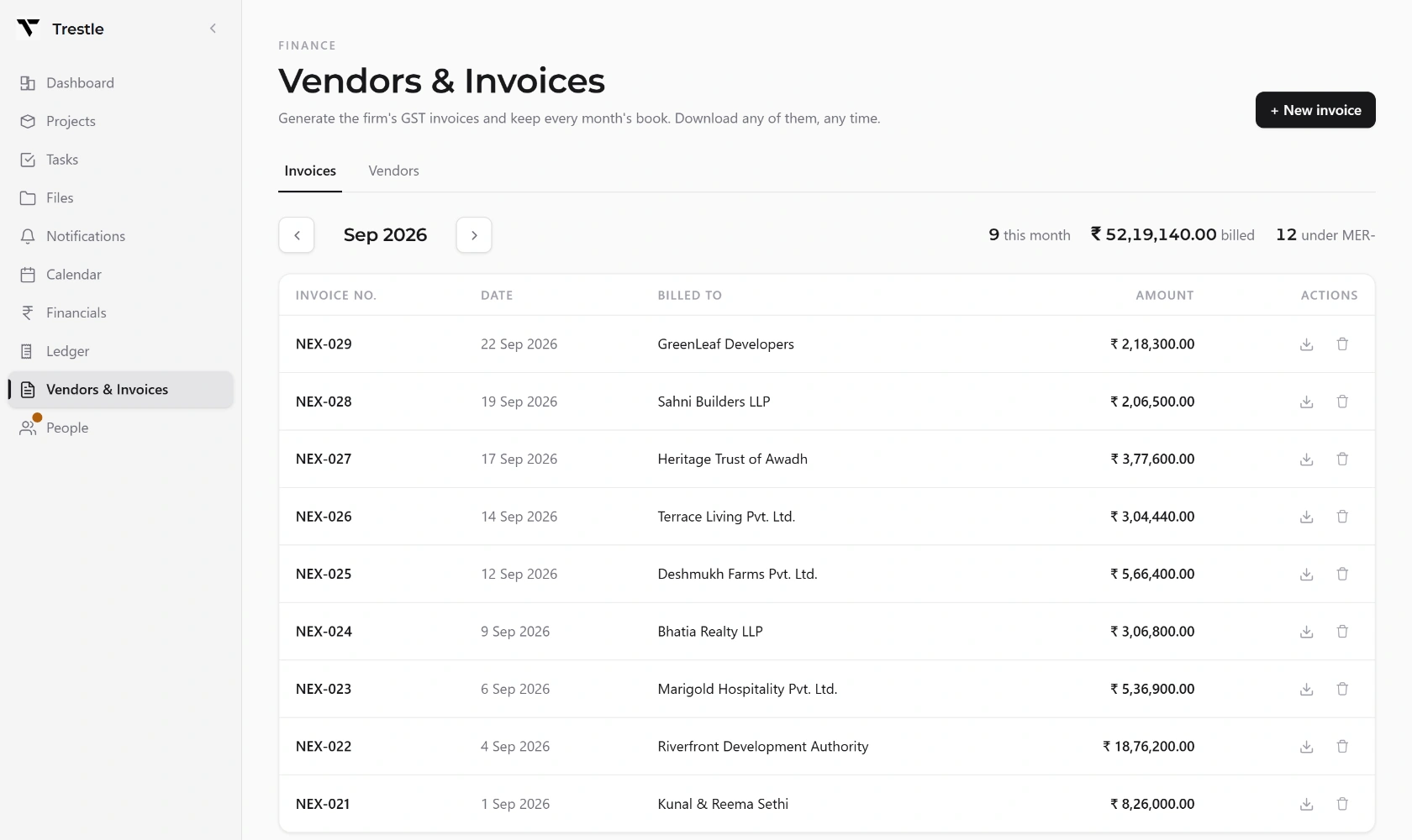
Trestle · Vendors & Invoices
The Trestle invoice register for a month, listing GST invoices by number, date, client and amount.
  • 1GST invoice generation, built to Indian GST formatting, ready to send.
  • 2Your firm's letterhead, applied automatically to every invoice. It looks like it came straight from your office, because it did.
  • 3Automatic invoice numbering. No more manually tracking which invoice number comes next, and no duplicate or skipped numbers.
  • 4Pulled directly from project fees, so every invoice matches exactly what the client actually owes on that project.
5 of 7

The Ledger

Replaces the manual Excel cashbook, properly, for an Indian firm.

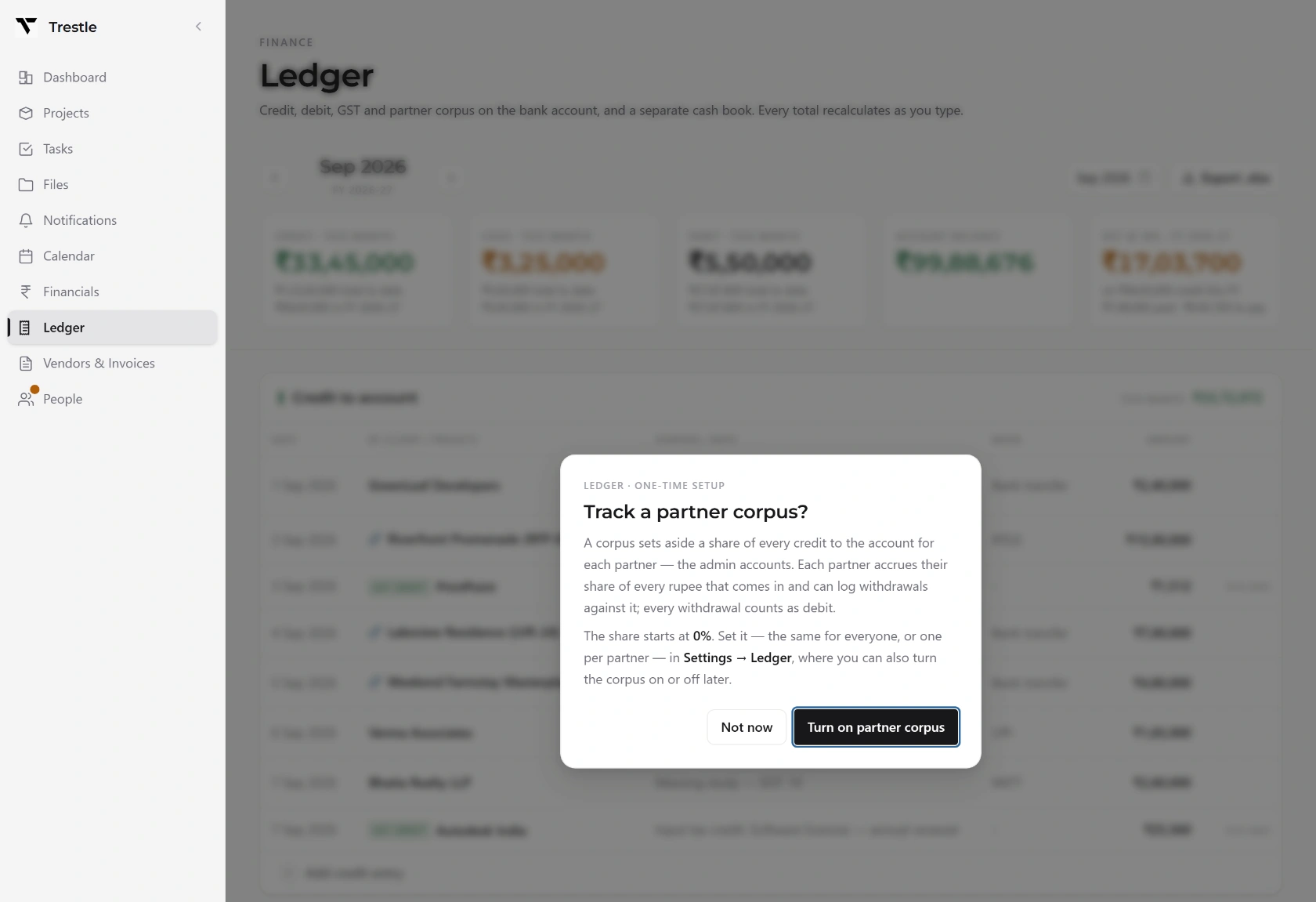
This is the heart of Trestle's money side, and it is built for exactly how Indian architecture firms actually handle their finances, not a generic accounting tool that does not understand partner shares or the cash and GST split.

Trestle · Ledger
The Trestle ledger for a month, with credit, cash in hand, debit, account balance and GST owed, above the credit table.
  • 1Income, expenses and taxes, all tracked in one place, following the Indian financial year (April to March).
  • 2Cash and GST kept properly separate, the way firms actually need it, not lumped together.
  • 3Partner corpus and profit shares tracked directly. A firm with multiple partners can see exactly where the money sits between them.
  • 4Client payments and owner drawings, recorded cleanly and separately.
  • 5Project fees and dues, visible per-project and firm-wide, so nothing owed is ever forgotten.
  • 6Filter and sort by date, project, or category. Pull up any month, any project, or any category of spend instantly.
6 of 7

File System

Every drawing, in its place, and open in AutoCAD with one click.

Every project gets its own organised folder inside Trestle, so drawings and documents do not end up scattered across laptops, USB drives, or a dozen WhatsApp chats.

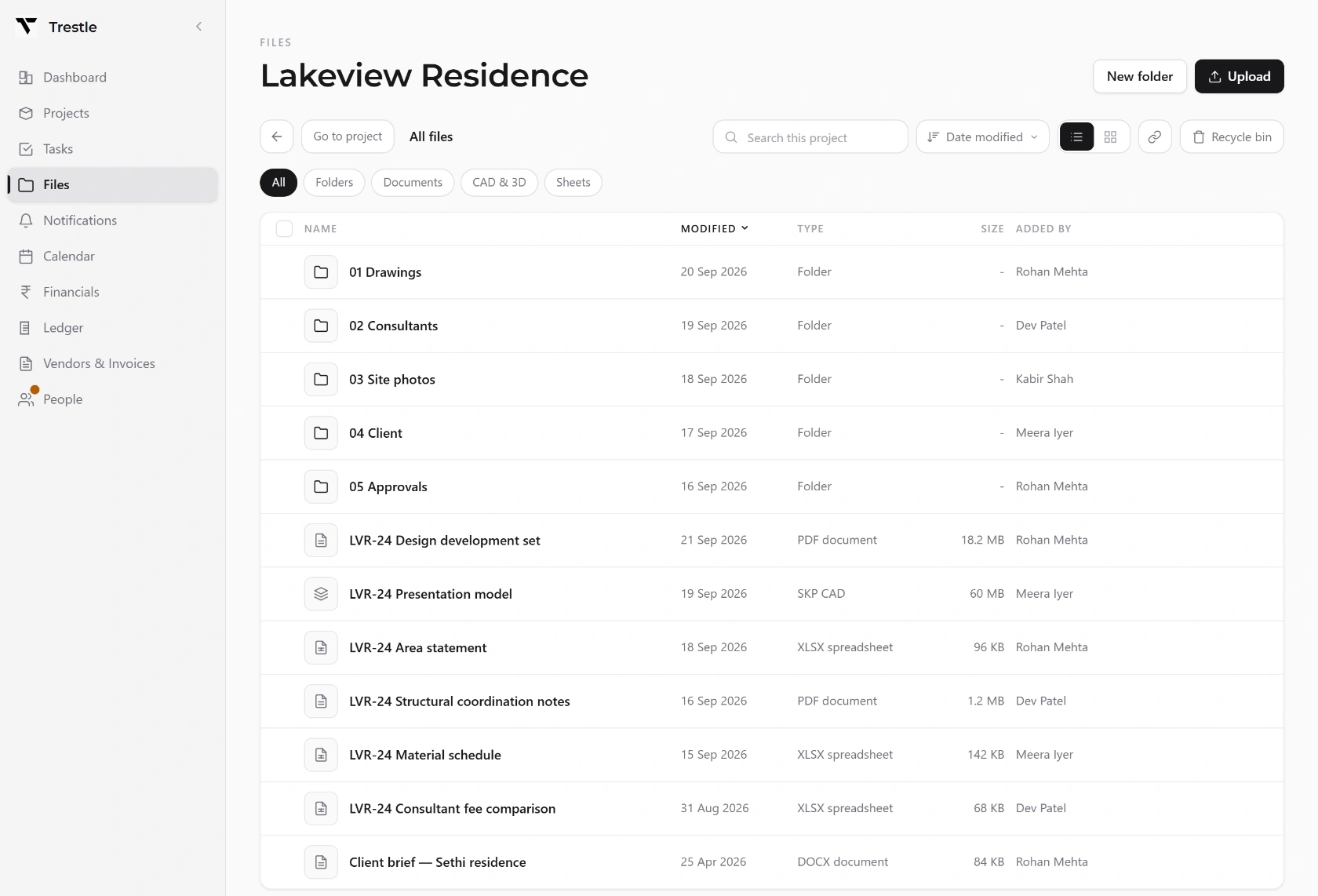
Trestle · Files
The Trestle file manager inside a project, listing drawing folders and files with their type, size and who added them.
  • 1Per-project folder structure, kept clean and consistent across every project in the firm.
  • 2Files stay inside their project. Staff reach the drawings for the projects they are assigned to, and nothing from the ones they are not. A project someone is not on is not theirs to open, search, or download.
  • 3Search across all project files instantly, across the projects you are on. No more digging through folders trying to remember where a drawing was saved.
  • 4Recycle bin. A deleted file is not gone forever, it can be recovered.
  • 5AutoCAD companion helper. Click a drawing inside Trestle and it opens straight in AutoCAD. Save your changes, and the office copy updates instantly. No re-uploading, no emailing files back and forth.
  • 6Consultant & supplier contact book, kept alongside the files, so contact details are never lost in someone's personal phone.
7 of 7
The firm's project tracker, accountant, HR system, and file server, rolled into one private app that lives on their own office computer.

No cloud. No internet dependency.

Start free. Pay when the firm grows.

Trestle runs the practice for nothing, for as long as you like. Paid tiers lift the caps and turn on the money side, and are priced by the number of employees you can add.

Free

No licence needed

Up to 3 team accounts · 5 projects

Install it and start. No card, no trial clock, nothing expires. The free plan is a plan, not a countdown.

  • Projects, tasks and automatic checklists
  • Passive attendance & leave
  • Employee timesheets
  • Per-project files & the AutoCAD companion
  • Project documents & the firm recovery key

Where it stops

  • Up to 5 projects
  • Up to 3 team accounts (admins and partners don't count)
  • No Financials, Ledger or GST invoicing
Start free

Everything you record on the free plan stays yours. Subscribe later and the caps lift and the money side switches on; nothing is hidden or deleted if you never do.

Paid tiers, by team size

Studio

Up to 5 employees

Price on request

For a small practice or a partner-led studio getting organised.

Practice

Common

5 to 20 employees

Price on request

For an established firm running several projects at once.

Firm

20 to 50 employees

Price on request

For a larger office with multiple teams and project leads.

Unlimited

50+ employees

Price on request

No cap on how many people you add. For firms at full scale.

Every paid tier includes everything

  • Projects & tasks with automatic checklists
  • Passive attendance & leave management
  • Employee timesheets, pay & efficiency
  • GST invoicing on your own letterhead
  • The full Ledger, built for Indian firms
  • Per-project file system & AutoCAD companion
  • Admin, Employee and Accountant roles
  • All data stored locally, in your office
Download

Runs on one computer in your office. Talk to us to get set up.